
Who Can Use the Fancy Portal
The portal is built for teams who support resident experiences and oversee operational performance. If you are responsible for onboarding, leasing, marketing, or retention, this is your workspace.
This includes:
- Property managers at Fancy-enabled buildings
- Leasing and onsite staff who introduce residents to Fancy
- Portfolio managers who supervise multiple properties
- Marketing and operations teams focused on engagement and reporting
If you are unsure whether your property is live with Fancy, email us at support@fancy.com and we will confirm your status.
What You Can Do in the Portal
The Fancy Portal gives your team everything needed to manage the resident rewards experience from a single place. Whether you are onboarding residents, reviewing program performance, or promoting new incentives, every feature is built to simplify your workflow and maximize impact.
Upload and Manage Residents
Add residents individually or upload them in bulk using the portal’s roster tools. You can update contact details, assign or adjust unit numbers, and mark move-outs as needed. Keeping your list accurate helps ensure that residents remain eligible for rewards and receive the right communications.
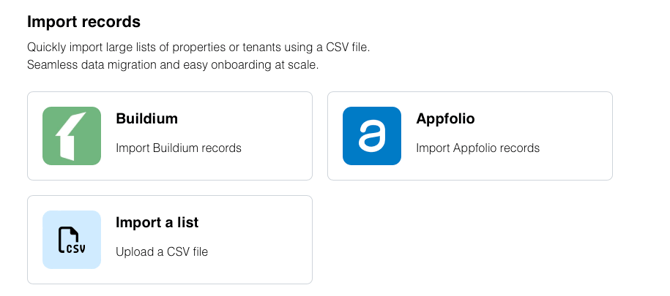
Invite Residents to Join
Once residents are added, you can send email invitations to activate their Fancy accounts. The portal shows you who has joined, who is still pending, and gives you the option to resend invitations or follow up. Residents complete setup in just a few steps.
Monitor Engagement and Performance
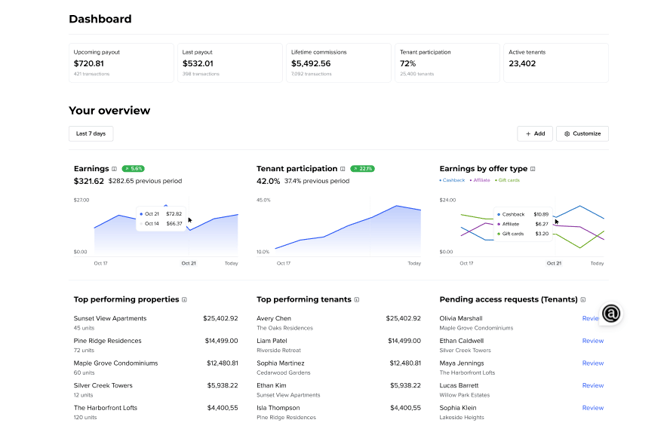
Your dashboard provides a clear, real-time view of how your program is performing. You can track:
- Upcoming and past payouts
- Total rewards earnings and lifetime commissions
- Active tenant participation and adoption rates
- Engagement by offer type, including cashback, affiliate activity, and gift cards
- Top-performing tenants and properties
- Pending tenant access requests that may need review
These metrics help you evaluate engagement, benchmark results across properties, and identify opportunities to improve participation.
Manage Property Listings and Customize Pages
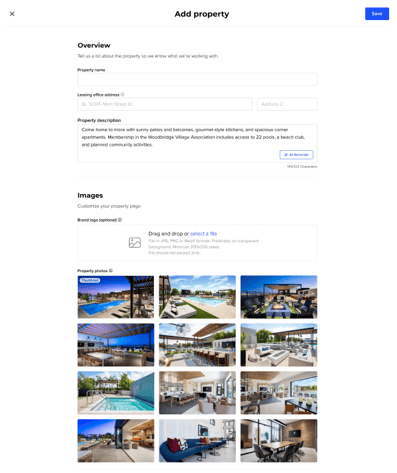
The portal allows you to create and manage detailed property profiles. Each listing can include:
- The property name and leasing office address
- A description highlighting your amenities and community value
- An optional logo upload and a full gallery of property photos
These pages enhance how your property is represented inside the Fancy app. You can update your listing any time to reflect changes or highlight new features.
Create and Customize Incentives
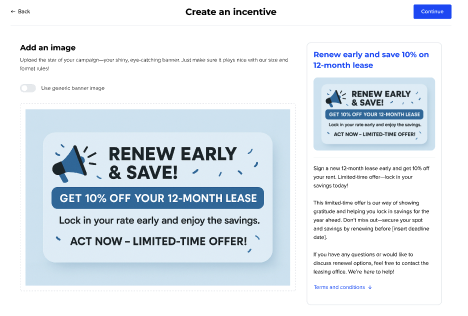
The portal makes it easy to launch targeted incentives that encourage resident behavior. You can build campaigns such as lease renewal bonuses, onboarding promotions, or seasonal offers with just a few steps. Each incentive includes a banner image, a clear title, and a custom description.
These campaigns can help you:
- Encourage early lease renewals
- Boost engagement during move-in periods
- Align resident activity with property goals
Published offers appear directly in the resident app and can be managed or updated whenever needed.
View and Edit Resident Profiles
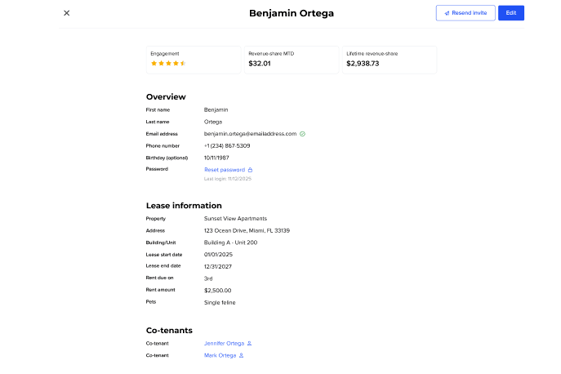
From the tenant directory, you can click into individual resident profiles to view activity and manage details. Each profile displays:
- Tenant name, email address, and birthday
- Lease dates, rent amount, and unit details
- Reward earnings to date and engagement level
- Co-tenant relationships, if present
You can update resident info, resend account invites, or reset passwords directly from this screen. This makes it easy to support residents and resolve questions quickly.
Access Promotional Tools
To help promote Fancy onsite, the portal includes a full set of branded materials. You can download flyers, posters, and QR codes for use in common areas or events. You will also find ready-to-use content for email and newsletter announcements.
If you would like additional or customized materials, email us at [support@fancy.com] and we will be happy to assist.
Add Team Members to the Portal
You can grant portal access to other members of your team. This includes leasing agents, onsite staff, and portfolio managers who need visibility into resident activity and program performance.
To add a team member:
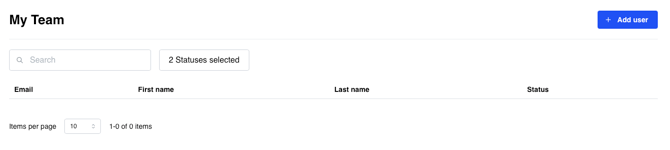
- Go to the My Team tab
- Click Add User
- Enter their name and email address
- Click Save
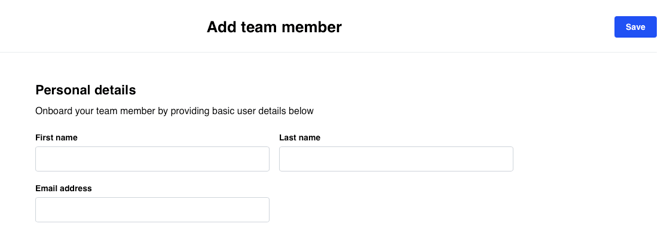
Each team member will receive an email with instructions to log in. Permissions are role-based so each user only sees what they need. If you have questions about access or settings, our support team is available to help.
Need Help
Support is always available. You can contact us through the Support tab in your portal or by emailing partnerships@fancy.com. Our team is here to help you make the most of Fancy and ensure your residents have a seamless experience.
We are also constantly updating our knowledge base with the latest features and enhancements in the Fancy Portal, so be sure to check back regularly for new tips, tools, and walkthroughs.